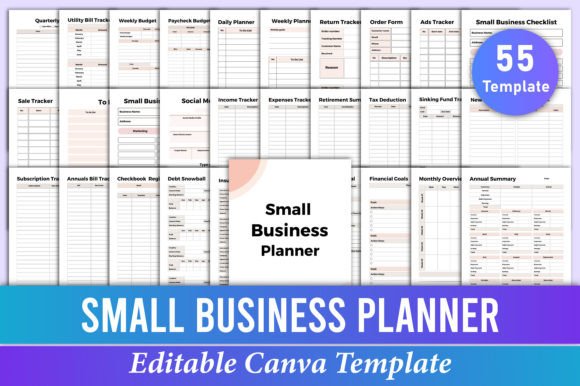
Master Your Business with an Editable Canva Planner
A small business lives and breathes in the details. When you're managing orders, tracking ads, planning social media, and keeping an eye on your financial health all at once, it's easy to feel scattered. That's exactly where a thoughtfully designed Small Business Planner Canva Template becomes a game-changer. Instead of juggling a dozen different notebooks and spreadsheets, you bring everything into one clean, customizable space. The beauty of this resource is that it's not a rigid system you have to fit into—it's a foundation you can shape to match exactly how your mind works and how your business operates.
What makes this planner template truly stand out is its dual nature. You receive a complete, print-ready PDF at 8.5 x 11 inches, perfectly formatted for a binder or disc-bound system. But before you ever hit print, you get full access to edit every element inside Canva. Change the fonts to match your brand's voice. Swap colors to reflect your visual identity. Rearrange the order of pages so your most-used trackers sit right up front. You can even add your logo or a motivational quote to the cover. This isn't just a static set of pages—it's an evolving toolkit that grows with you.
Why a Structured Yet Flexible System Matters
Running a small business often means wearing every hat in the company. You're the creative director, the accountant, the marketing lead, and the customer service rep. Without a central command station, important tasks slip through the cracks. A Small Business Planner Canva Template offers a backbone for your operations without suffocating your unique workflow. The template includes over 40 specialized pages, from daily planning sheets to niche financial trackers like a Sinking Fund Tracker or a Debt Snowball. You choose what to print and what to leave behind, so your planner never feels bloated.
The editable Canva link puts the power of design in your hands without requiring any advanced skills. Maybe you're a freelance photographer who wants clean, minimal layouts with soft neutral tones. Or perhaps you run a bold, vibrant online boutique and need planner pages that pop with energy. You can edit text, play with layout styles, and even add your own icons or imagery. This flexibility ensures the planner feels personal and intentional, which means you're far more likely to actually use it daily.
Creative Ways to Customize the Template for Your Workflow
The real magic happens when you start tailoring this planner to your specific business model. Think beyond just filling in blanks—consider how each section can morph into a command center for different areas of your work.
For the Creative Freelancer or Designer
If you bill by project and manage multiple clients, you might duplicate the Income Tracker and label separate copies for each client or income stream. Use the Order Form not just for physical products but to log project milestones, deposit due dates, and final delivery schedules. The Social Media Planner becomes a content calendar where you map out portfolio posts, client shoutouts, and behind-the-scenes reels. Change the color coding to match each client's brand preview so at a glance you know who you're working on. You can even add a custom page for project brief summaries using Canva's text tools.
For the Product-Based Small Business Owner
Run an Etsy shop or a local bakery? The Sales Tracker and Ads Tracker are your best friends. Customize the Return Tracker to log exchanges, replacements, or customer feedback trends. Because orders might come in multiple sizes or flavors, you can edit the Order Form to include a breakdown section for variants. The Monthly Bills Tracker and Utility Bill Tracker keep overhead costs visible; assign a specific highlighter color to note seasonal spikes so you can forecast cash flow. Print a fresh batch of Weekly Budget pages at the start of each month and pin them above your packing station.
For the Digital Creator or Marketer
If your business lives online, the Social Media Planner becomes your editorial hub. Customize it inside Canva to add columns for engagement metrics, hashtag groups, and link-in-bio updates. Pair it with the Ads Tracker to monitor your ad spend across platforms like Instagram, TikTok, and Pinterest. Use the Subscription Tracker to log all your SaaS tools—Canva, email marketing, analytics—and set a quarterly review reminder right on the Quarterly Bills Tracker. Because formats and algorithms change, you can easily duplicate and tweak pages for each new campaign without starting from scratch.
Turning Financial Clarity Into a Confidence Booster
Many small business owners feel a knot in their stomach when they think about the money side of things. The right planner can shift that anxiety into a sense of control. This template doesn't just give you a single expense tracker and call it a day. It digs deeper with tools like the Net Worth Tracker, Retirement Summary, Investment Tracker, and Tax Deduction log. For someone who's never tracked these areas before, simply seeing the labeled categories prompts you to gather information you might have been avoiding.
Start with a gentle approach. In your first month, only use the Bank Account and Credit Card Info pages to centralize your account details. In month two, add the Expenses Tracker and categorize every outgoing penny. By month three, you'll naturally feel ready to tackle the Debt Payoff Goals or map out a 52-week saving challenge. Because everything is together, your financial picture becomes a story you can read—and rewrite. If you're a visual person, use Canva to add progress bars or color-coded priority stars to your Financial Goals page. Seeing that yes, you did reduce your credit card balance by 12%, is a powerful motivator.
Keeping Your Planner Organized and Actionable
A packed binder can quickly turn into a guilt-inducing paperweight if you're not careful. The key is to treat your Small Business Planner Canva Template as a living document, not an archive you fill in and forget. Start each week by reviewing the To Do List and Weekly Planner. Transfer any unfinished items from last week. Use the Small Business Checklist to perform a monthly operational review—did you update your inventory spreadsheet, back up your files, or review your subscription costs? This ritual keeps the planner functional rather than decorative.
Resist the urge to print every single page at once. Focus on the trackers you'll genuinely reference. A beginning entrepreneur might live in the Daily Planner, Income Tracker, and Monthly Overview. As you grow, introduce the Annual Summary, Yearly Overview, and Upcoming Expenses log. The editable Canva file lets you revisit and adjust your selection whenever your needs shift. If a page never gets used, delete it from your master copy. If you find yourself scribbling the same note repeatedly, create a new custom page for it.
Consistency also comes from how the planner feels. Choose a font that's not just pretty but highly readable at 9 or 10 point. If you write with a fountain pen, test your paper choice. The template is ready at 8.5 x 11 inches, a standard size that fits most binders and disc systems, so you can easily source high-quality paper without resizing. The print-ready PDF ensures sharp, professional results whether you print at home or at a local shop.
Adapting the Planner for Team or Collaborative Use
Perhaps you're not a solo operator. Maybe you run a small team of two or three people. The planner can still serve as a shared reference. Print a master copy of the Social Media Planner and hang it on the office wall. Use the Order Form as a physical backup for digital orders. Even if most of your tracking lives in apps, having a tangible summary board reduces the mental load of constant screen switching. You can customize the Ads Tracker with columns for who is responsible for each campaign, adding initials fields right in Canva.
For educators or workshop leaders using a business model with multiple revenue streams—courses, consulting, digital downloads—the planner becomes a budget hub. Use the Monthly Budget and Paycheck Budget pages to separate personal and business finances clearly. The Spending Tracker and No Spending Tracker can be adapted for specific project costs or even a self-imposed buying freeze during a slow season. The Donation Tracker isn't just for charitable giving; you could reframe it as a sponsorship log if you support community events for brand visibility.
Making It Uniquely Yours Without Losing Function
When you open the template in Canva, treat it like a wardrobe you get to tailor. The bones are strong: logical categories, clean alignment, and practical labels. But the personality is yours. A minimalist might strip the pages down to black and white with a single accent color. A stationery lover might add delicate floral corner graphics or a themed color palette for each quarter. The editable link lets you change text, so if "Return Tracker" doesn't match your business language—you call them exchanges or swaps—adjust it. Your planner should sound like you.
One of the most underrated advantages of this template is how it encourages regular reflection. The Yearly Income, Annual Summary, and Monthly Overview pages aren't just for looking forward; they're for looking back with gratitude and data. Fill them in a little at a time, and you'll have a year-end snapshot that informs your next year's strategy. It's tangible proof of your growth that a cloud dashboard simply can't replicate. And because you can reprint and revise each year inside Canva, your planner evolves as your mindset does.
Practical Tips for Printing and Long-Term Use
To get the most out of your Small Business Planner Canva Template, consider how you'll physically interact with it. If you prefer a disc-bound planner, purchase a punch and covers that fit 8.5 x 11 sheets. Print the pages you need each quarter, and use tab dividers labeled with categories like "Finances," "Marketing," and "Daily Ops." The high-quality PDF ensures your dividers will withstand frequent flipping. If you're traveling or prefer a lighter setup, shrink the pages to half-letter size using your printer settings—just test the readability of your chosen font first.
For those who work mostly digitally but still crave a paper backup, print only the summary pages and fill them in weekly from your digital logs. This hybrid approach keeps you from duplicating effort while still giving you that satisfying, high-level overview. The template's flexibility means there's no single right way to use it; the only rule is that it serves you, not the other way around.
Don't be afraid to date your pages lightly in pencil or use erasable pens. The Debt Tracker numbers will change, and you may want to reuse a well-designed Weekly Budget sheet several times before retiring it. The editable Canva file is always there when you need a fresh stack, maybe with a slightly tweaked layout that better fits your current workflow.
Ultimately, a Small Business Planner Canva Template bridges the gap between creative ambition and operational discipline. It validates the messy, beautiful reality of running your own show and gives you a structure that bends to your will. Whether you're tracking ad performance, saving for a new piece of equipment, or simply trying to remember what you actually accomplished on Thursday, these pages become a quiet business partner—always ready, totally customizable, and refreshingly straightforward.